Generators
Running one or more generators over an information model to produce concrete output files is the primary purpose of the Model Transform Tools (MTT).
Existing Generators
MTT provides several pre-built generators out of the box, categorized by output artifact type:
-
API Specification Generators
- OpenAPI Specifications: Generates RESTful interface contracts complying with the OpenAPI 3.0+ standard.
- GraphQL Specifications: Generates type definitions and operation schemas conforming to GraphQL standards.
-
Schema Definition Generators
- AOCO (Common Services): Produces Micro Format Definition (MGD) documents for C2/military information exchange.
- Reversed Schema: Generates JSON Schema definitions conforming to the custom Reversed specification format.
-
Documentation Generators
- Information Model Documenter: Generates standard Markdown files documenting entity structures.
- Static Sites: Compiles generated Markdown directly into technical documentation portals using Material for MkDocs.
Developing New Generators
As detailed in the MTT Overview, the core architecture of the MTT Internal Model is designed to make creating custom generators fast, flexible, and language-agnostic.
When building a new generator, it is essential to understand how target specifications depend on underlying syntax standards:
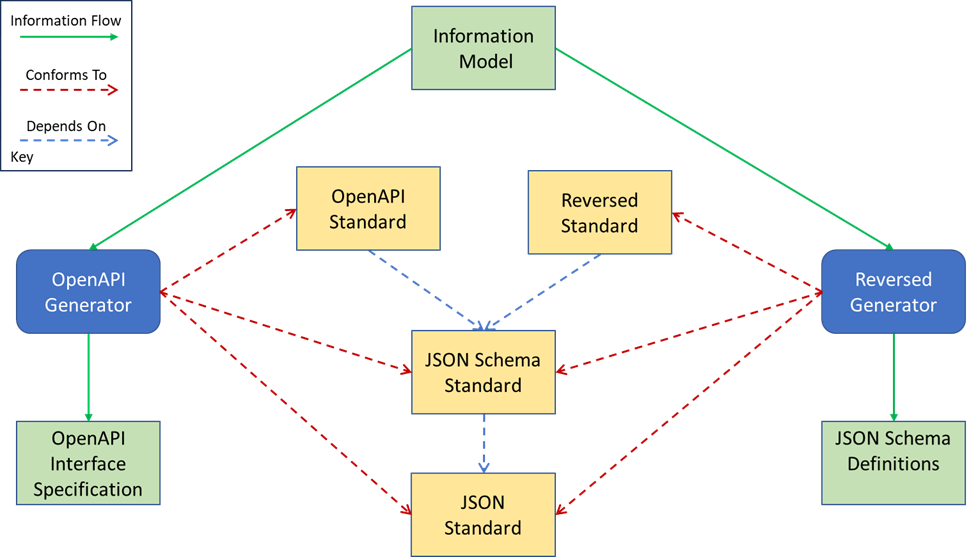 Figure 1: Relationship between low-level syntax formats and higher-level schema semantics
Architectural Principles
Layered Standards
Higher-level specifications build upon foundational data formats. For instance, both OpenAPI and Reversed standards rely directly on the JSON Schema Standard and underlying JSON Standard for basic syntax.
Syntax vs. Semantics
Custom generators must enforce two distinct compliance levels:
- Format (Syntax): Conforming to base rules (e.g., valid JSON/YAML formatting and basic JSON Schema datatypes).
- Structure (Semantics): Enforcing higher-level domain rules and enterprise standards defined by the specific target output (e.g., OpenAPI endpoints, operation paths, or GraphQL resolvers).
Next Steps
- Check how generator rules are specified in Project Structure.
- Learn how to trigger generators locally or via CI/CD in Running the Tool.